

Dwell Time
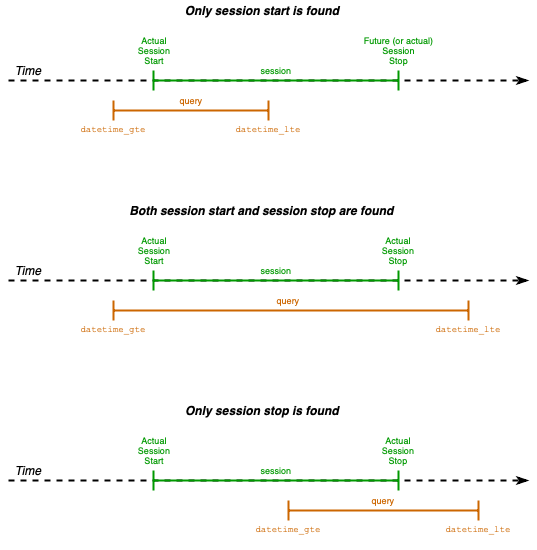
This resource returns the dwell time (the duration of a user’s stay or visit) for a specific store and time interval. The response contains a list of results. Each result item represents a session.Session: A session starts (is created) at the moment the SDK consumer subscribes for InOut updates and closes when the SDK consumer unsubscribes. Typically, this occurs at application launch. In case the app goes to background, the session closes. When the app comes to foreground again, a new session starts. Finally, when the application is terminated abruptly, the session is never closed.The following image depicts the different cases of filtering sessions by datetime.
Resource [GET]
[/bi/dwelltime/]
This resource supports pagination. Due to the increased data volume, adding pagination to this resource enables fetching data in batches (pages) over a specific time interval.
URL Parameters
store_codeThe store code - Optionaldatetime_gteAn date string (in UTC) to be used as greater than or equal for filtering - Requireddatetime_lteAn date string (in UTC) to be used as less than or equal for filtering - Requireddevice_idThe identifier of the user’s device - Optionalpage_sizeThe number of results in each page of the response - Optional Default value is used when param is not givenpageThe number of the page of the response - Optional Needed only when the response is paginated
Note : Default page_size = 1000. Maximum page_size = 10000
Response
The response is paginated. Thecount property shows the total results of the query. The next property contains the link of the subsequent page in case there is any - otherwise it has null value. Likewise with previous property. Finally, the results property contains the array of sessions either for a page or for the entire result. If page_size (default or set by the client) > count then only one page of results is returned and next and previous properties are null. To consume all pages, the client needs to continue fetching page-by-page using link provided within the next property until null value is found (last page - all sessions fetched).
In each result object, the following data are available:
session_idThe session identifier - UUIDstore_codeThe store code - Stringdevice_idThe device identifier (filled by BespotSDK) - UUIDuser_idThe user identifier (provided by the BespotSDK consumer) -UUID or empty string ("") if not providedalt_user_idAn alternative user identifier (provided by the BespotSDK consumer) -String or empty string ("") if not providedvisit_startThe date and time the visit (or the session) started - ISO 8601 Date and time with timezonevisit_stopThe date and time the visit (or the session) ended - ISO 8601 Date and time with timezonevisit_durationThe duration of the visit (or the session) in seconds - Integer
Note 1: Regarding the device_id value. In BespotSDK for Android it is created in every new application installation. In BespotSDK for iOS the identifierForVendor value is used - see more details here.
Note 2: Last item in the array above shows an active session - not ended yet. Values in the visit_stop and visit_duration fields is null
Example cURL
Unique users’ count
This resource returns the unique users’ count for a specific store and time interval.Resource [GET]
[/bi/unique-users-count/]
URL Parameters
store_codeThe store code - Optionaldatetime_gteAn date string (in UTC) to be used as greater than or equal for filtering - Requireddatetime_lteAn date string (in UTC) to be used as less than or equal for filtering - Required
Response
Example cURL
Sessions’ count
This resource returns the session count for a specific store and time interval.Resource [GET]
[/bi/sessions-count/]
URL Parameters
store_codeThe store code - Optionaldatetime_gteAn date string (in UTC) to be used as greater than or equal for filtering - Requireddatetime_lteAn date string (in UTC) to be used as less than or equal for filtering - Required