

auth url, client id, client secret) directly. This is the recommended approach for client-side applications, because storing client credentials on a device or in a browser is not secure.
Your backend must therefore expose an endpoint that returns a valid JWT access token, acting as a server-side token broker. Your client applications must call this endpoint before SDK initialization; your backend acquires the token from Gatekeeper using the OAuth 2.0 Client Credentials Flow while securely keeps the client credentials server-side; the valid JWT access token is returned to your client applications; the Gatekeeper SDK is initialized with this token.
Your client applications are responsible for timely updating the JWT access token before expiring.
Token Retrieval Flow
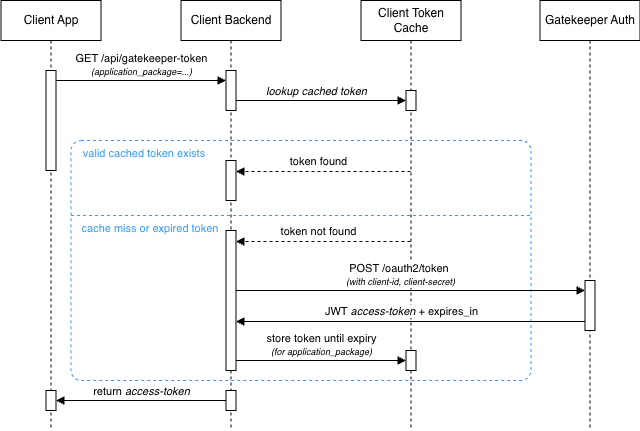
- Token request from the Client App Your Client App (iOS, Android, or Web) requests a Gatekeeper JWT access token from your Client Backend through the
/api/gatekeeper-tokenendpoint. Theapplication_packageparameter identifies the application for which the token is required. - Check the token cache Your Client Backend checks the Token Cache for an existing access token associated with the specified
application_package. - Use a valid cached token If a valid, non-expired token is found in the cache, your Client Backend retrieves it and uses it to fulfill your Client App’s request. No request to the Gatekeeper Auth Server is required.
- Obtain a new token when necessary If no valid token is available — for example, because the token is missing from the cache or has expired — your Client Backend requests a new JWT access token from the Gatekeeper Auth Server using the OAuth 2.0 Client Credentials flow via the
/oauth2/tokenendpoint (see OAuth 2.0 Client Credentials Flow). - Cache the new token The Gatekeeper Auth Server returns the JWT access token together with its
expires_invalue. Your Client Backend should store the token in your Token Cache and keeps it available until its expiry. - Return the token to the Client App Your Client Backend returns the JWT access token to your Client App, regardless of whether the token was retrieved from the cache or newly obtained from the Gatekeeper Auth Server.
This caching mechanism reduces unnecessary authentication requests to the Gatekeeper Auth Server, speeds up the response times and allows multiple requests from the Client App to reuse the same valid access token - for the specific
application_package - until it expires.Endpoint Specification
Resource [GET]
[{CLIENT_SERVER_URL}/api/gatekeeper-token]
Replace {CLIENT_SERVER_URL} with your application’s backend url.
Query Parameters
Your backend uses this value to select the correct OAuth 2.0 client credentials for the corresponding platform.
Response
Status:200 OK
Body
Return the JWT access token formatted in JSON.
JSON:
Error Responses
Return appropriate HTTP status codes when:application_packageis missing or unknown (400 Bad Request)- Gatekeeper credentials for the given application are not configured (
401 Unauthorized) - The Gatekeeper auth server rejects the request (
502 Bad Gatewayor503 Service Unavailable)
Backend Responsibilities
- Store credentials securely. Keep the
AUTH_SERVER_URL,client_id, andclient_secretfor each application platform in a secure store (environment variables, secrets manager, or encrypted configuration). Never expose them to client applications. - Map
application_packageto credentials. Maintain a lookup from the incomingapplication_packagevalue to the OAuth 2.0 credentials registered with Gatekeeper for that platform. - Acquire a JWT from Gatekeeper. When no valid cached token is available, request a new access token from
{AUTH_SERVER_URL}/oauth2/tokenas described in Authenticate with Gatekeeper. - Cache valid tokens. Client applications may call this endpoint frequently. Cache each JWT until it expires. Use the
expires_invalue from the Gatekeeper auth response, or decode the JWT and read theexpclaim. Invalidate the cache entry when the token expires and request a fresh token on the next call.
Caching Strategy
- Cache key: Use
application_packageas the cache key so each platform/application has its own token. - TTL: Set the cache entry lifetime to the token’s remaining validity. Subtract a small safety margin (e.g. 30–60 seconds) from
expires_into avoid returning a token that expires before the SDK uses it. - Invalidation: When a cached token expires, discard it and fetch a new one from Gatekeeper on the next request.
- Storage: An in-memory cache is sufficient for a single-instance backend. Use a shared cache (e.g. Redis) if your backend runs on multiple instances.
Code Examples
The examples below implement aGET /api/gatekeeper-token endpoint with token caching. Replace placeholder values with the Gatekeeper auth server URL and credentials provided in Gatekeeper platform.
- Python (Flask)
- Kotlin (Ktor)
- Java (Spring Boot)
- Ruby (Sinatra)
- Go
- Rust (Axum)
Code examples above are AI generated. Consult your development team to integrate the new endpoint properly in your backend code.