> ## Documentation Index
> Fetch the complete documentation index at: https://docs.bespot.com/llms.txt
> Use this file to discover all available pages before exploring further.
# Authentication
> Authentication model, credentials, and token handling for the API.
# Authenticate with Gatekeeper
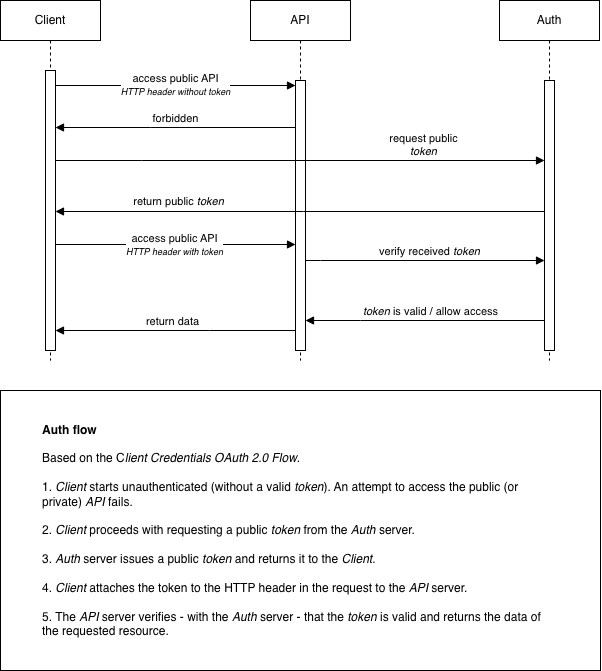
Bespot authentication is based on OAuth 2.0 Client Credentials Flow, as defined in [RFC 6749, section 4.4](https://tools.ietf.org/html/rfc6749#section-4.4), for authenticating clients and authorise them to access protected resources. This page is organised to depict this flow, describe the related components and, finally, provide instructions for a client on how to achieve that.
 ## Components
### Client
The client is either Bespot's SDKs that request access to resources or any 3rd party server that needs to be authenticated and communicate securely with the system. The client needs to provide valid *credentials*, acquire an *access token* and, finally, use it for accessing protected resources.
### Gatekeeper Auth
Bespot Gatekeeper uses an external Auth server for authenticating clients. To achieve that, the OAuth 2.0 Client Credentials Flow is used. More specifically, a *client id* and a *client secret* need to be provided as input to the /oauth2/token endpoint. Then, if the credentials provided are valid, the authentication is successful, and an *access token* is returned. The *access token* is in the form of JWT based on [RFC 7519](https://datatracker.ietf.org/doc/html/rfc7519). Finally, this *access token* is used to retrieve resources from the Gatekeeper API (see below). The *access token* is only valid for a predefined period. If the *access token* expires, the client needs to start over with the authentication process and acquire a new one.
### Gatekeeper API
Bespot's Gatekeeper API is a collection of protected resources. To consume any Gatekeeper API resource, the `Authorization` HTTP header is **required**. Firstly, each client needs to be authenticated with the Gatekeeper Auth server, providing the authentication credentials and acquire a valid *access token*.
## Usage
See below the details of the authentication request to acquire the JWT *access token*.
### Resource \[POST]
`[{AUTH_SERVER_URL}/oauth2/token]`
The `AUTH_SERVER_URL` is provided securely along with the credentials.
### Request
**Headers**
* `Content-Type: application/x-www-form-urlencoded`
* `Authorization: Basic Base64Encode(client_id:client_secret)`
> **Example**
>
> The following is an authorization header for app client `djc98u3jiedmi283eu928` with client secret `abcdef01234567890`, using the Base64-encoded version of the string `djc98u3jiedmi283eu928:abcdef01234567890`:
Authorization: Basic ZGpjOTh1M2ppZWRtaTI4M2V1OTI4OmFiY2RlZjAxMjM0NTY3ODkw
>
**Body**
`grant_type` should also be set to `client_credentials` and passed as url encoded data.
### Response
**Body**
The response is in JSON format and has the following structure:
```json JWT theme={null}
{
"access_token": "{JWT-ACCESS-TOKEN}",
"expires_in": 86400,
"token_type": "Bearer"
}
```
```json theme={null}
```
### Example cURL
```shell theme={null}
curl --location '{AUTH_SERVER_URL}/oauth2/token' \
--header 'Content-Type: application/x-www-form-urlencoded' \
--header 'Authorization: Basic ZGpjOTh1M2ppZWRtaTI4M2V1OTI4OmFiY2RlZjAxMjM0NTY3ODkw' \
--data-urlencode 'grant_type=client_credentials'
```
# Authorization in Gatekeeper API
Bespot, along with access tokens, uses API keys to authorize different types of clients to access different types of resources.
* The acquired *access token* should be provided in each Gatekeeper API request for the client to be authorised to access the resources. The `Authorization` HTTP header should be filled with the acquired JWT *access token* prefixed with the following string: `Bearer `.
* The acquired *API Key* should be provided in each Gatekeeper API request to allow access to resources corresponding to specific client types.
## Usage
Each client connected to Gatekeeper API should provide both the acquired API Key and the acquired access token as HTTP headers in each request.
> **Example**
>
> `x-api-key: {X-API-KEY}`
>
> `Authorization: Bearer {JWT-ACCESS-TOKEN}`
The `X-API-KEY` is provided securely along with the credentials.
## Components
### Client
The client is either Bespot's SDKs that request access to resources or any 3rd party server that needs to be authenticated and communicate securely with the system. The client needs to provide valid *credentials*, acquire an *access token* and, finally, use it for accessing protected resources.
### Gatekeeper Auth
Bespot Gatekeeper uses an external Auth server for authenticating clients. To achieve that, the OAuth 2.0 Client Credentials Flow is used. More specifically, a *client id* and a *client secret* need to be provided as input to the /oauth2/token endpoint. Then, if the credentials provided are valid, the authentication is successful, and an *access token* is returned. The *access token* is in the form of JWT based on [RFC 7519](https://datatracker.ietf.org/doc/html/rfc7519). Finally, this *access token* is used to retrieve resources from the Gatekeeper API (see below). The *access token* is only valid for a predefined period. If the *access token* expires, the client needs to start over with the authentication process and acquire a new one.
### Gatekeeper API
Bespot's Gatekeeper API is a collection of protected resources. To consume any Gatekeeper API resource, the `Authorization` HTTP header is **required**. Firstly, each client needs to be authenticated with the Gatekeeper Auth server, providing the authentication credentials and acquire a valid *access token*.
## Usage
See below the details of the authentication request to acquire the JWT *access token*.
### Resource \[POST]
`[{AUTH_SERVER_URL}/oauth2/token]`
The `AUTH_SERVER_URL` is provided securely along with the credentials.
### Request
**Headers**
* `Content-Type: application/x-www-form-urlencoded`
* `Authorization: Basic Base64Encode(client_id:client_secret)`
> **Example**
>
> The following is an authorization header for app client `djc98u3jiedmi283eu928` with client secret `abcdef01234567890`, using the Base64-encoded version of the string `djc98u3jiedmi283eu928:abcdef01234567890`:
Authorization: Basic ZGpjOTh1M2ppZWRtaTI4M2V1OTI4OmFiY2RlZjAxMjM0NTY3ODkw
>
**Body**
`grant_type` should also be set to `client_credentials` and passed as url encoded data.
### Response
**Body**
The response is in JSON format and has the following structure:
```json JWT theme={null}
{
"access_token": "{JWT-ACCESS-TOKEN}",
"expires_in": 86400,
"token_type": "Bearer"
}
```
```json theme={null}
```
### Example cURL
```shell theme={null}
curl --location '{AUTH_SERVER_URL}/oauth2/token' \
--header 'Content-Type: application/x-www-form-urlencoded' \
--header 'Authorization: Basic ZGpjOTh1M2ppZWRtaTI4M2V1OTI4OmFiY2RlZjAxMjM0NTY3ODkw' \
--data-urlencode 'grant_type=client_credentials'
```
# Authorization in Gatekeeper API
Bespot, along with access tokens, uses API keys to authorize different types of clients to access different types of resources.
* The acquired *access token* should be provided in each Gatekeeper API request for the client to be authorised to access the resources. The `Authorization` HTTP header should be filled with the acquired JWT *access token* prefixed with the following string: `Bearer `.
* The acquired *API Key* should be provided in each Gatekeeper API request to allow access to resources corresponding to specific client types.
## Usage
Each client connected to Gatekeeper API should provide both the acquired API Key and the acquired access token as HTTP headers in each request.
> **Example**
>
> `x-api-key: {X-API-KEY}`
>
> `Authorization: Bearer {JWT-ACCESS-TOKEN}`
The `X-API-KEY` is provided securely along with the credentials.